
How to Setup Read-Only Access for Developers with Audit Logs
Developers need a way to look at production data when something breaks. Read-only access is the usual first grant: troubleshooting and operational questions, without permission to change rows. It still has to name the person and keep a record of the queries. This guide sets that up with Kviklet, which is self-hosted and open source: a read-only database user, SSO, and an audit log of each statement that runs through it.
The reason to give engineers access at all is in should engineers have production access. Migrations, ad-hoc writes, and temporary write access are in the DevOps production database access guide.
Updated 10 October 2026.
TL;DR
Give each engineer their own SSO login and a read-only path to the production database. They run queries through that path, and the database password stays on the server. Every statement on the path is in an audit log under their name. Writes stay on a separate grant.
Why Read-Only Access?
Read-only access allows developers to:
- Troubleshoot issues: Quickly identify and resolve bugs by examining live data.
- Generate reports: Access production data for ad-hoc reporting without compromising data integrity. Of course ideally you have a working BI setup for this, but as explained in a previous blog sometimes this is just not sufficient (yet).
- Feature Development: Understand the data model and relationships to develop new features effectively. Typical questions are: Is this column nullable? What is the data type of this column? What is the distribution of this column?
However, without proper controls, this can lead to security risks, data breaches, or accidental data manipulation. This is where audit logs and access control come into play.
How to give developers read-only database access safely
Four controls, used together:
- A login that cannot write. A database user with
SELECTonly. The Postgres statements later in this post are that user. The database then rejectsINSERT,UPDATE, andDELETEfrom that login. - One identity per engineer. SSO, so each engineer signs in as themselves. Disabling the account removes their access.
- The database password stays on the server. The engineer submits the SQL, or opens a proxied session. The connection string is not something you paste into chat.
- A log of the statement. Who ran it, which database, and when.
Kviklet is built for that path. The engineer requests the SQL, Kviklet executes it with the credential stored on the connection, and the audit history keeps the statement. Set the number of required reviews to 0 when read-only queries should run without waiting on a second person. Keep writes on a connection that still requires approval. The open-source edition includes that request, approve, and execute flow, SSO through OpenID Connect and LDAP, and the audit history. You run it yourself.
Read-only replica, read-only role, or proxy
These answer different questions. A safe setup often uses more than one.
Read-only replica
A replica is another server holding a copy of the data. Point reporting and heavy SELECTs there so they stay off the primary. It can lag, so a row written a moment ago may be missing when you are debugging an incident. A replica is also still a database: whoever has its password can read it, and the replica itself does not tell you which person ran which query.
Read-only role
A read-only role is a user granted connect and SELECT. That is the Postgres example in the next section. It stops accidental changes from that login. If the whole team shares the password, the role still cannot tell the statements apart, and anyone who also knows a privileged password can bypass it.
Proxy
A proxy is the process the engineer connects to, with psql or DBeaver, instead of connecting to the database host. The proxy holds the database credential and can record each statement. Kviklet's database proxy does this for PostgreSQL, MySQL, and MariaDB during an access window. The proxy is part of the enterprise edition. Microsoft SQL Server and MongoDB are available in the web application.
The open-source path is the same control in the web app. The engineer submits the statement, Kviklet runs it with the stored credential, and the audit history stores the statement.
Use a role so the database rejects writes. Use a replica when the load should leave the primary. Use a proxy or the request screen so the password stays on the server and each query is tied to a person. A proxy often connects as a read-only role, and that role can point at a replica.
Setting Up Read-Only Access with Kviklet
Step 1: Deploy Kviklet
First, deploy Kviklet as a Docker container. Feel free to go to our repository and copy the docker-compose setup. Otherwise here's a quick setup guide:
-
Prepare the Database: Kviklet needs its own database to store metadata about queries, connections, and approvals. Although you can use MySQL, Postgres is recommended. You can find the official image here: https://hub.docker.com/_/postgres.
-
Start the Docker Container:
docker run \
-e SPRING_DATASOURCE_PASSWORD=postgres \
-e SPRING_DATASOURCE_USERNAME=postgres \
-e SPRING_DATASOURCE_URL=jdbc:postgresql://localhost:5432/kviklet \
-e [email protected] \
-e INITIAL_USER_PASSWORD=someverysecurepassword \
--network host \ # Use host network for simplicity otherwise kviklet just uses port 80, which you can also expose instead.
ghcr.io/kviklet/kviklet:main
If you see
Tomcat started on port(s): 8080 (http)in the logs, Kviklet is up and running. Don't be confused by the port though, There is an nginx proxy that makes sure Kviklet is accessible on port 80.
Step 2: Create a read-only user on the database
Kviklet needs a read-only user to access the database. This user should have the necessary permissions to execute read-only queries. Here's how you can create a read-only user in Postgres:
CREATE ROLE readonly_user WITH LOGIN PASSWORD 'password';
GRANT CONNECT ON DATABASE your_database TO readonly_user;
GRANT USAGE ON SCHEMA public TO readonly_user;
GRANT SELECT ON ALL TABLES IN SCHEMA public TO readonly_user;
ALTER DEFAULT PRIVILEGES IN SCHEMA public GRANT SELECT ON TABLES TO readonly_user;
If you have specific tables that the user should not have access to, you can also revoke the SELECT permission on those tables. If you use MYSQL or Microsoft SQL Server you might want to ask your favorite AI agent for help or look it up in teh documentation of your database.
Step 2: Configure Database Connections
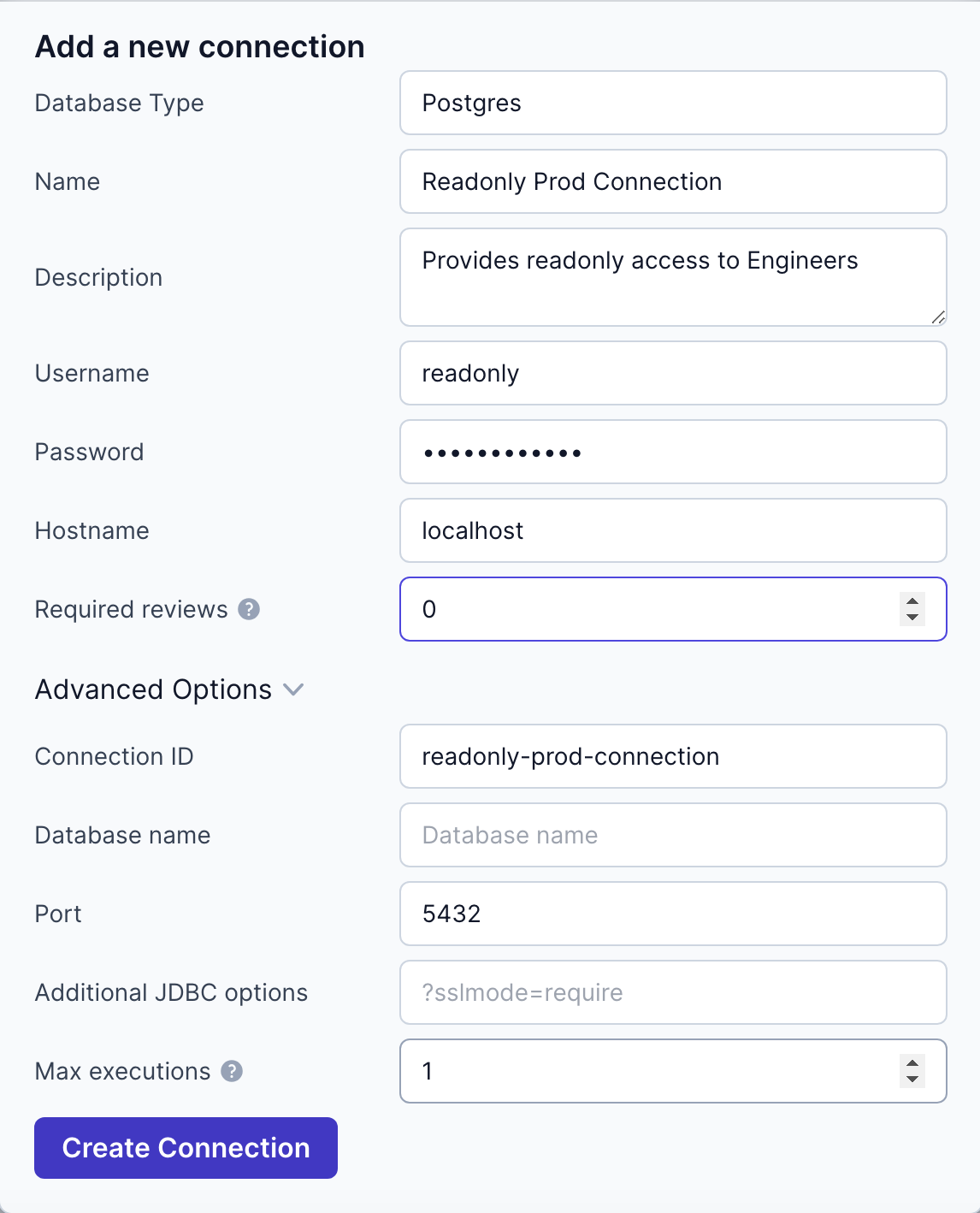
After deploying Kviklet, log in to the web interface at http://localhost and configure your database connections:
- Navigate to Settings -> Databases -> Add Connection.
- Fill in the connection details for your production database. (username, password, host, port etc.)
- Configure the number of reviews required for running requests. If you simply want to provide every engineer with read-only access, you should set this to 0.
Step 3: Set Up Roles and Permissions
The default Developer Role allows developers to access any connection and create Requests. If you do not have any other connections set up yet, this is perfectly sufficient for read-only access. However, if you want to restrict access further, and add more connections (read separate database users) you might want to edit the developer role or create a separate readonly Role taht only has access to your new readonly connection.
- Create a Read-Only Role:
- Go to Settings -> Roles -> Create Role.
- Define the permissions for this role, by choosing the ID of you new readonly connection you restrict the access of any user with this role to this specific connection.
- Assign the Role to Users:
- Navigate to Settings -> Users.
- Assign the read-only role to the relevant users.
Step 4: Implement SSO for Authentication
Unless you want to create users for your developers manually and create passwords for each one, you should enable Single Sign-On (SSO) to streamline authentication and enhance security:
- Google SSO Setup:
- Obtain your Google client ID and secret by following Google's instructions.
- Configure valid redirect URIs:
http://[kviklet_host]/api/login/oauth2/code/googlein google. - Set the following environment variables in your Kviklet container:
KVIKLET_IDENTITY_PROVIDER_CLIENT_ID=your-client-id
KVIKLET_IDENTITY_PROVIDER_CLIENT_SECRET=your-client-secret
KVIKLET_IDENTITY_PROVIDER_TYPE=google
- Or Keycloak SSO Setup:
- Set up a client in Keycloak and obtain the client ID and secret.
- Set the following environment variables:
KVIKLET_IDENTITY_PROVIDER_CLIENT_ID=your-client-id
KVIKLET_IDENTITY_PROVIDER_CLIENT_SECRET=your-client-secret
KVIKLET_IDENTITY_PROVIDER_TYPE=keycloak
KVIKLET_IDENTITY_PROVIDER_ISSUER_URI=http://[host]:[port]/realms/[realm]
- Assign Roles After Login:
- After users log in via SSO, assign them the appropriate role in Kviklet. Alternatively you can simply edit the default role to give access to your new connection. Then you no longer have to do anything manually.
Step 5: Enable Audit Logging
Kviklet logs the database statements that run through it:
- View Audit Logs:
- Navigate to Audit Logs in the Kviklet interface.
- Review all executed queries, including who executed them and the reasons provided.
Step 6: Test the Setup
Before rolling out to the entire team, thoroughly test the setup:
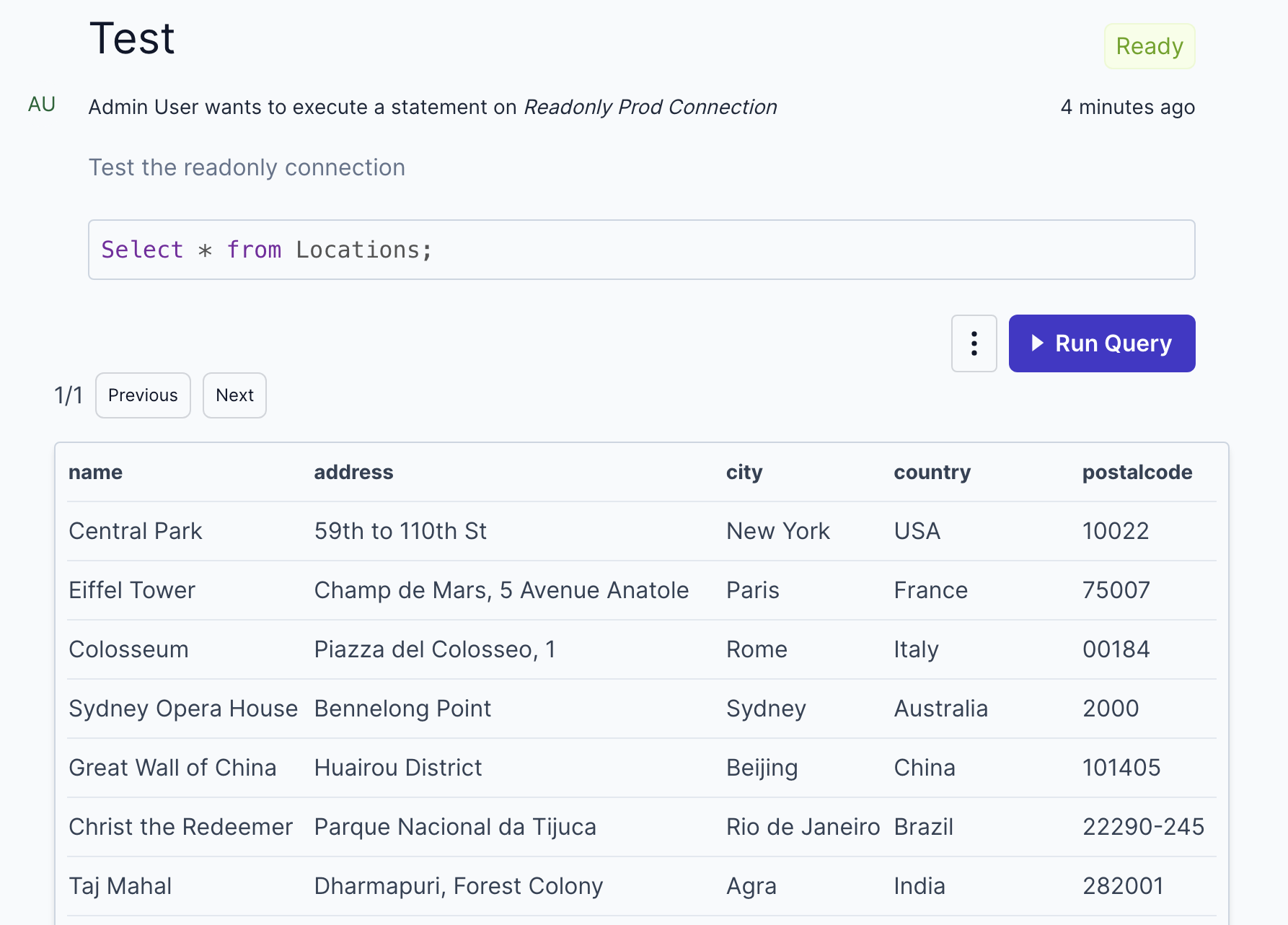
- Create Test Users: Assign them the read-only role.
- Run Queries: Have them perform various read-only queries.
- Review Audit Logs: Verify that all queries are logged correctly.
- You now have a self-service path: each engineer signs in, runs a read-only query, and the statement is stored under their name.
How SSO and an audit log fit in
SSO and the audit log answer different questions. You want both.
SSO answers who is allowed in. The Google and Keycloak steps above are that half. Kviklet also supports OpenID Connect and LDAP, including Google through OpenID Connect. When someone leaves, deactivate their Kviklet account and remove them from the identity provider. That ends their access. It does not list the SELECT they ran last Tuesday.
The audit log answers what ran. Kviklet records the request, any review, and the executed statement: who, which connection, and when. Query results are not stored unless an administrator enables that for the connection. A session that connects straight to the database, and never passes through Kviklet, is outside this log.
SSO names the engineer. The read-only role limits what that login can change. The log shows the query. A team working toward SOC 2 or ISO 27001 can keep that log as evidence of who accessed production data. The log supports the effort. It does not certify the company, and running Kviklet does not make the company compliant.
Conclusion
By following these steps, you can set up read-only access for your developers and keep an audit log of the queries they run through it. Engineers can investigate production without a shared database password.
Ready to get started? Deploy Kviklet today and take control of your production database access. For more detailed instructions and community support, visit our GitHub repository. If something doesn't work, or you're stuck somewhere or you want a new feature, don't hesitate to open an issue or reach out to us directly. We're here to help you out.
FAQ
How do you give developers read-only access to a production database safely?
Create a database user that can only read, have each engineer sign in with SSO, and keep the database password on the server. Let them run queries by submitting SQL or through a proxy, and keep an audit log of each statement under their name. Leave writes on a separate grant that someone else approves.
What is the difference between a read-only replica, a read-only role, and a proxy?
A replica is a copy of the data on another server, so reporting can stay off the primary. A read-only role is a database user granted SELECT, so that login cannot change rows. A proxy sits between the engineer and the database, holds the credential, and can log each statement. A proxy often connects as a read-only role, and that role can point at a replica.
How do SSO and audit logs fit into read-only production access?
SSO gives each engineer their own identity, so you can turn one person off without rotating a shared password. The audit log records the statements they ran, on which database, and when. SSO does not list the queries. A log that only shows a shared read-only user does not tell you who was behind it.
Should engineers have read-only access to the production database?
Yes, for incidents and for questions a warehouse does not answer yet. Keep the grant read-only, tie it to a named SSO user, and keep an audit log of the queries. Permission to change rows is a different grant.
Does a read-only database user replace an audit log?
No. A read-only user stops that login from changing data. You still need a log of which person ran which statement. That matters most when several people would otherwise share one password.
How can engineers query production without the database password?
They sign in with SSO and submit the SQL, or connect through a proxy, and the tool uses a credential stored on the server. In Kviklet the open-source path is request and execute in the web app. The enterprise proxy lets them use psql or DBeaver for PostgreSQL, MySQL, and MariaDB during an approved window. They do not receive the production password. Queries that bypass the tool are not in its audit log.